Good Budget
Tools Used


Project Duration
2 weeks
Team
Two Students
Overview
"Goodbudget" is a budget tracking application. Users currently manually input their expenses. This study aimed to explore the addition of an automatic transaction entry feature to enhance user satisfaction.
Design Process

RESEARCH
DEFINE


IDEATE
DESIGN

TEST
Research
First, we formulated the initial hypothesis to be evaluated through research.
Hypothesis: adding a feature to the budget tracking app that allows users to automatically input financial data increases user satisfaction
Then, we conducted competitive analysis by reviewing other budge planner applications to assess how they automate data entry. We examined various user flows and analyzed user reviews. We found that incorporating the feature of connecting the app to the user’s bank account could be a viable choice. However, we were unsure if users would trust the app to provide their financial account information. Taking all of this into consideration, we created the survey questions. Here are the findings:
How do you import your financial data into a budget planner app?
Manually
Automatically
Both
62%
27%
11%
which one do you prefer for importing your data in a budget planner app?
Automatically
Manually
63%
37%
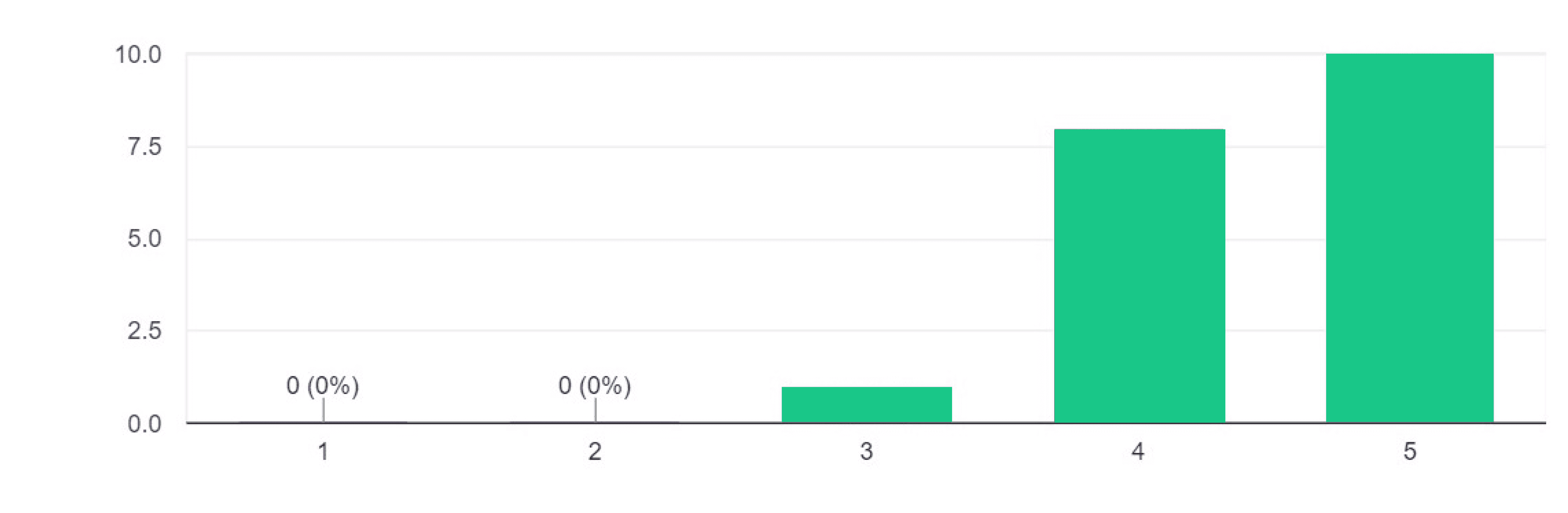
On a scale of 1 to 5, how interested are you in providing your financial account information in a budget planner app for the purpose of automatically importing your financial data? 1: Not interested at all - 5:Very interested

How concerned are you about the security and privacy of your financial data when importing it into a budget planner app? 1: Not concerned at all - 5: entirely concerned
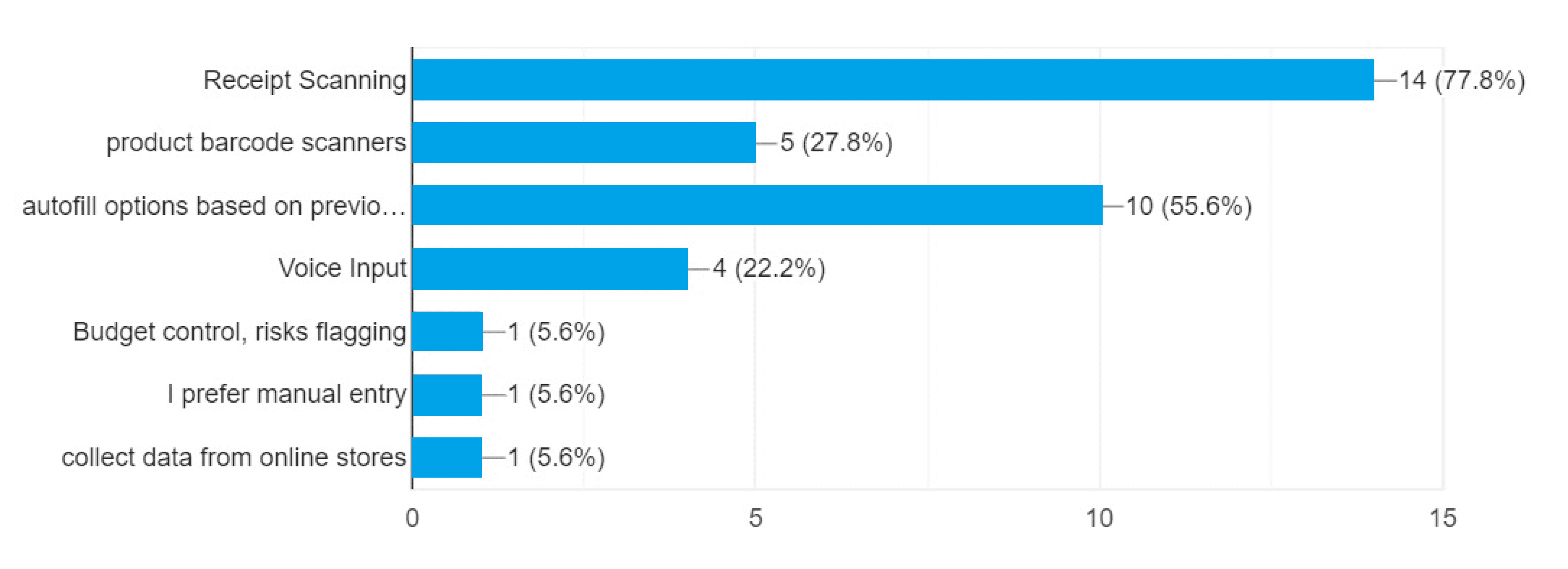
What features or functionality would you like to see in a budget planner app to facilitate importing data from expenses you have paid?
Survey Results Analysis
The hypothesis is confirmed
Users would like to have their financial accounts connected to the budget apps but they are highly concerned about security.
Among all the alternative solutions (voice input, barcode scanning &...) most of the users have a tendency to have “receipt scanning” option in their budgeting app.
Define
Problem: Designin a receipt scan feature for “Goodbudget” application.
Challenge
where in the user journey we could integrate this receipt scan feature?
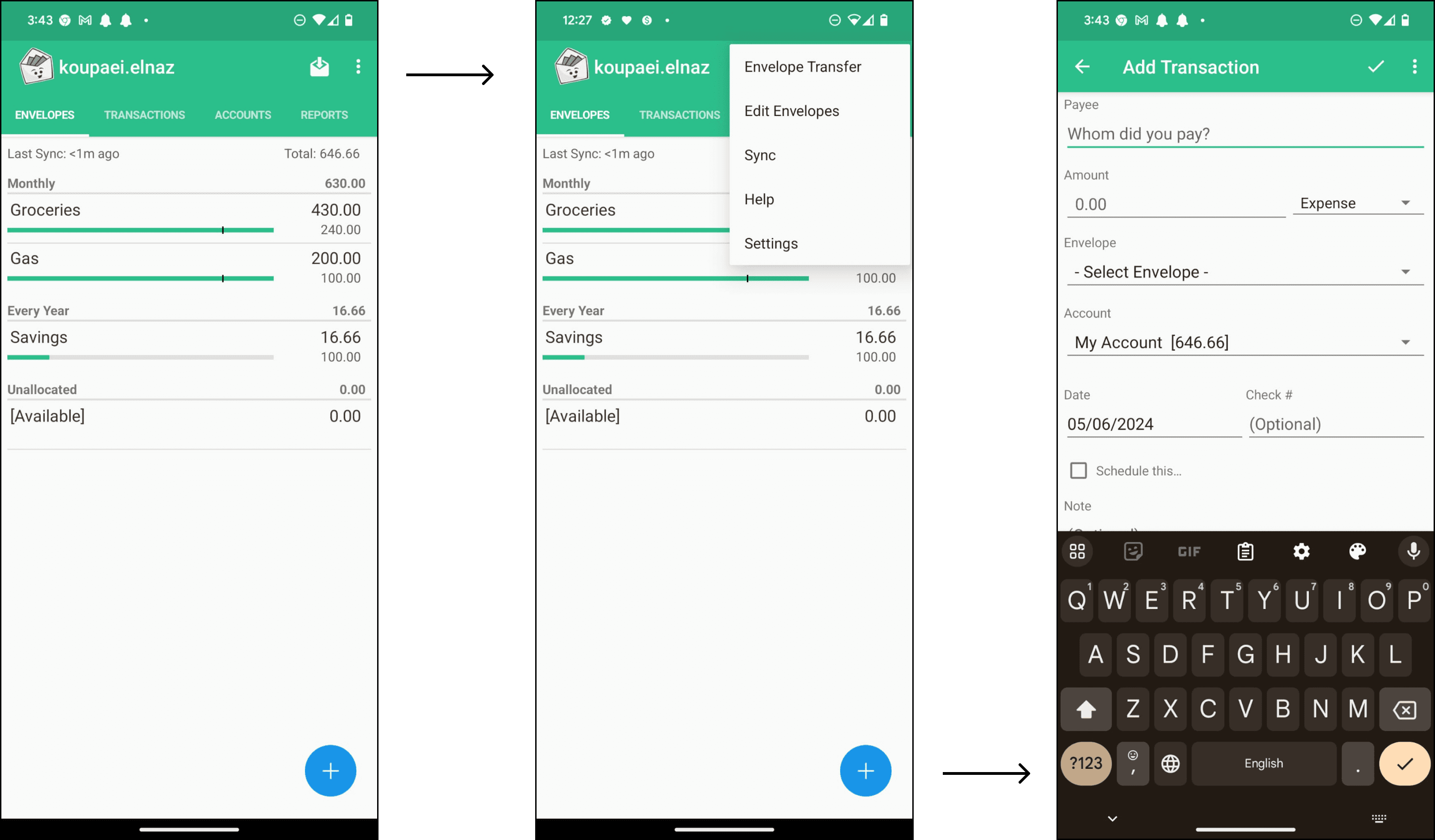
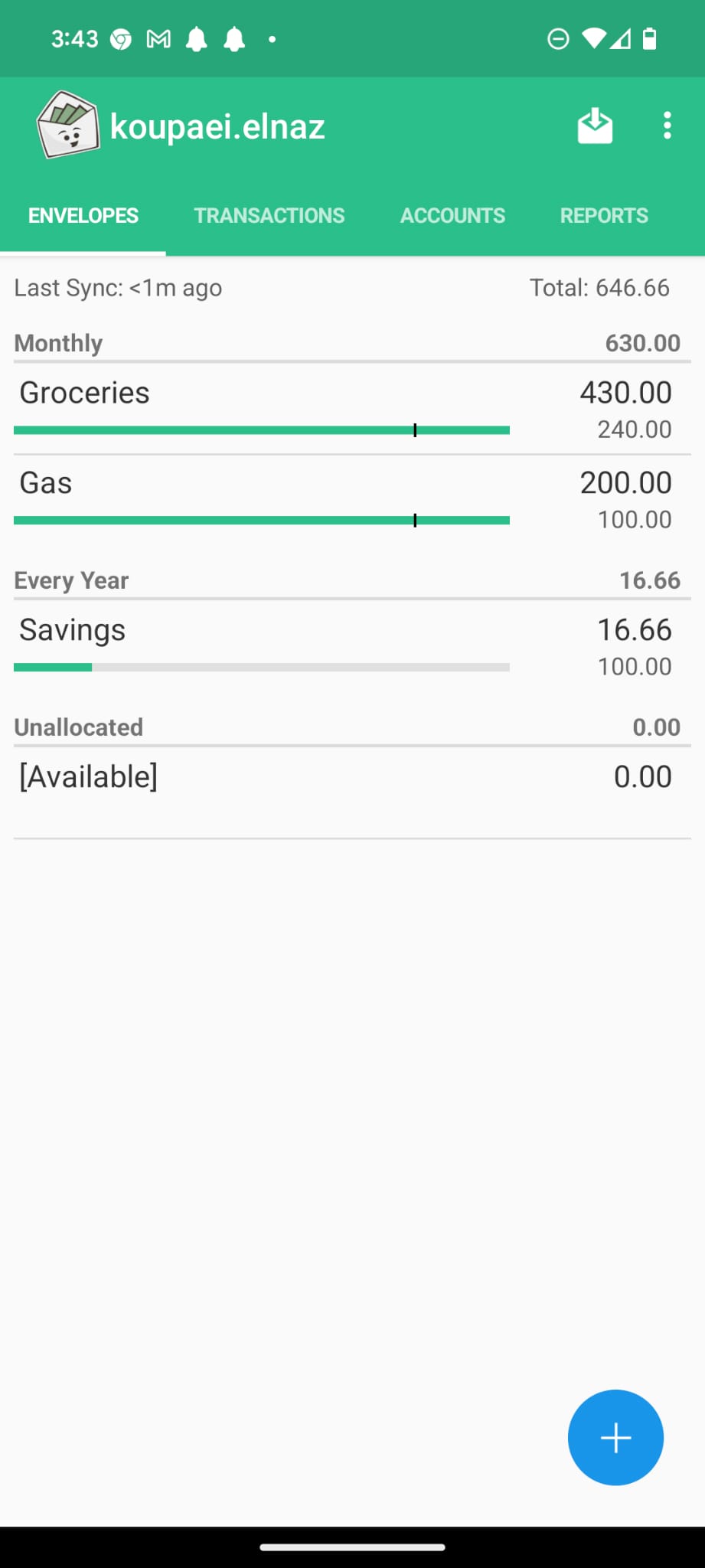
This is the user interface of the 'Goodbudget' application before the change.
Soluton
The 'Crazy Eight' method helped us brainstorm different solutions.

Research
we returned to the research phase to cultivate further empathy with the users. We interviewed three users to gain a deeper understanding of their needs and emotions. Based on its findings, we created the user journey map.
RESEARCH
DEFINE
IDEATE
DESIGN
TEST
User Journey Map
Scenario: Shiva wants to plan a birthday celebration for her nephew. She buys items from various shops and wants to add them to her budgeting app.

Buyying
She purchased birthday items from a supermarket, a clothing store, and a decoration store. In total, she spent 65 Euros today.
I need to input data when I arrive home.
Using the app
Shiva arrives home, worried about the amount of money spent. She still has a lot to do.
She opens her budgeting app and enters the information from one of her receipts. There are still two more remaining, and there are lots of fields to fill. Feeling overwhelmed, she closes the app.
It takes too much time to insert diffreent receipts manually.
Checking the budget
Next time Shiva looks at the budget app dashboard she sees 35 Euro is missing!
I have forgotten to input Two of the receipts on Tara’s birthday!
Insights

The user is already concerned about the amount of money spent and overwhelmed by the effort of buying various items when openning the app to input the data.n. Taking all of this into consideration, we created the survey questions. Here are the findings:
Conclusions

The receipt scanning feature should be very Clear & available and works without extra steps to reduce the presure.
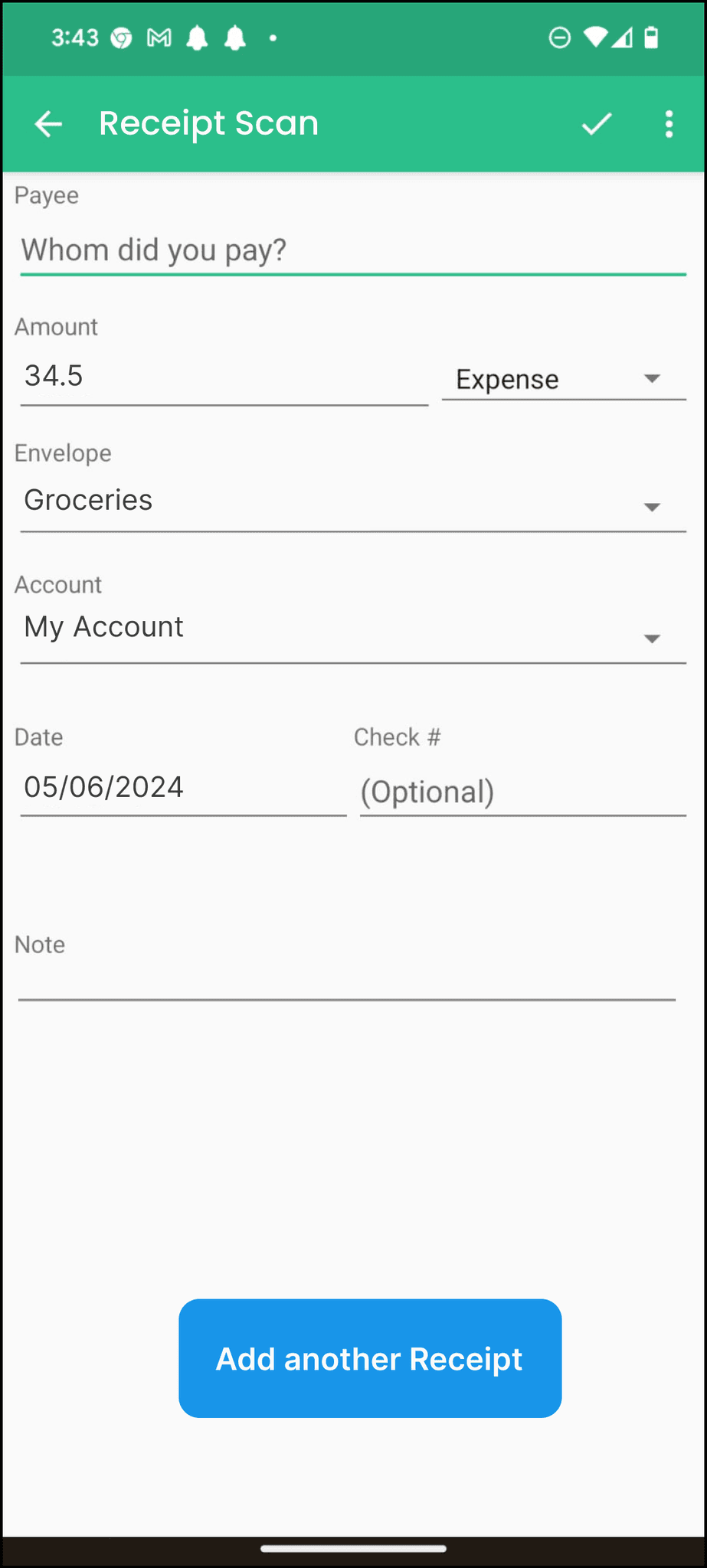
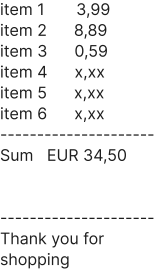
Data should be extracted and organized very clearly after scanning the photo.
Analyzing Crazy Eights
Considering the conclusions mentioned above, seven out of the eight ideas were rejected for the reasons outlined below.
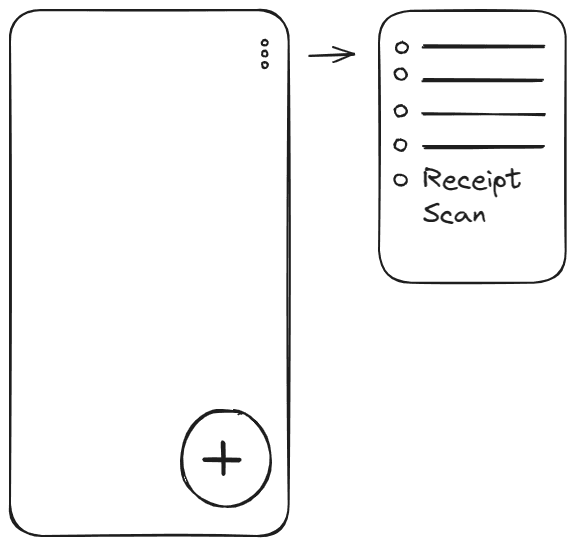
The receipt scan button is not visible in the Home page at first glance.
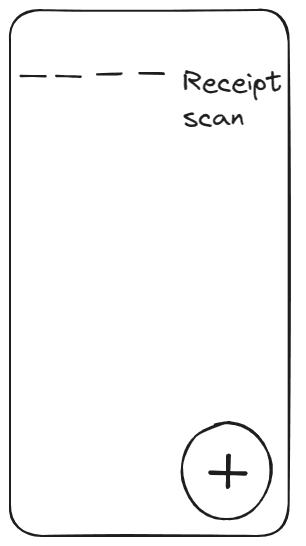
The receipt scan button and manual entry button are conceptually equivalent within the same category but are located in different places
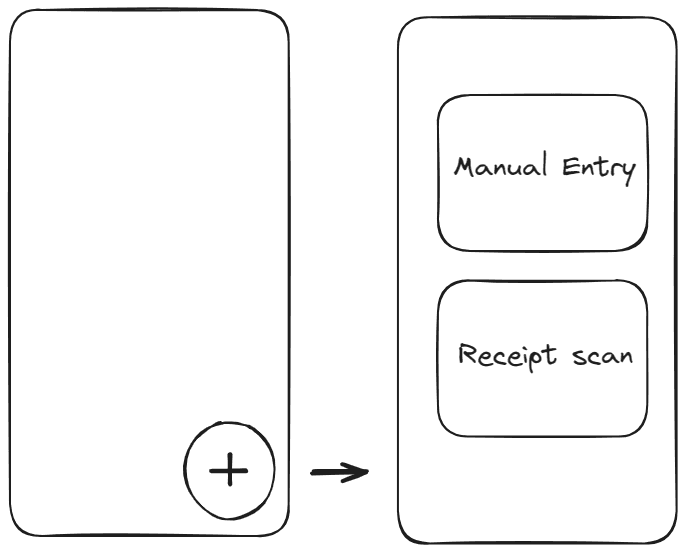
There is an additional step required to access the transaction entry buttons.
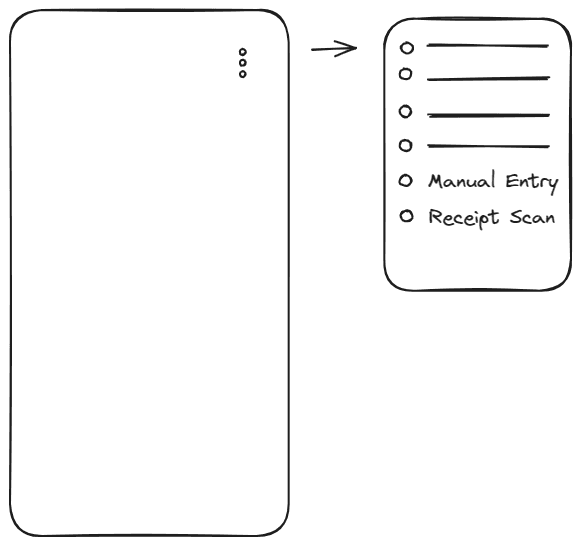
There is an additional step required to access the transaction entry buttons.They are also located at the same level as other items under the three-dot menu, even though they are more commonly used.
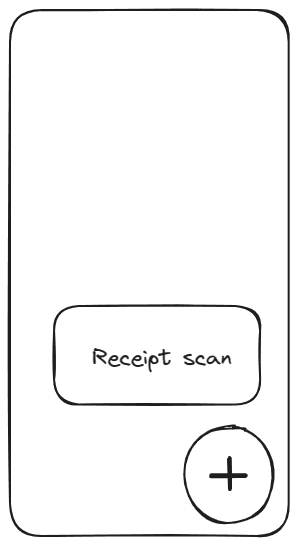
There is no reason why the receipt scan button should be more obvious than the manual entry button.
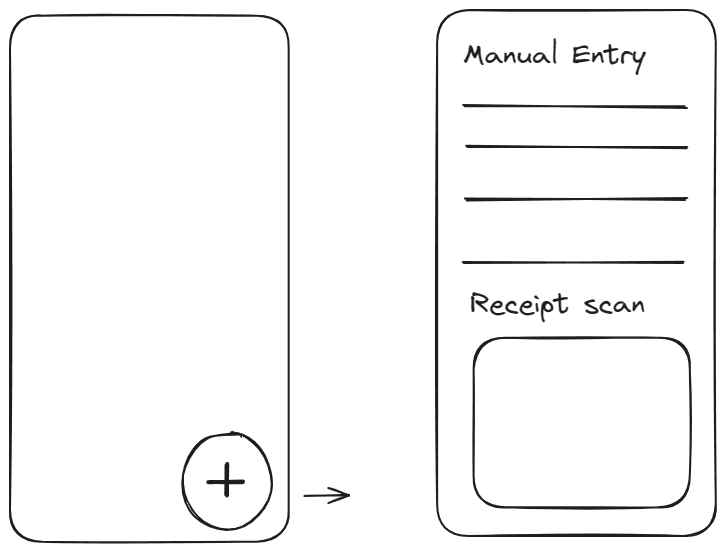
Placing the receipt scan button after the manual entry field makes this page confusing.
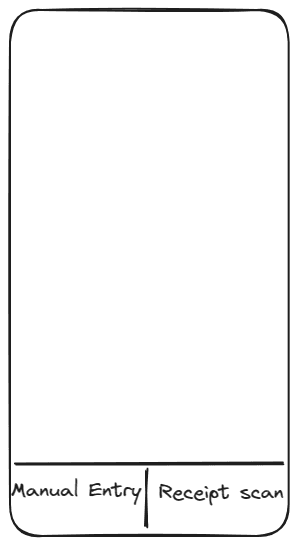
It's preferred not to remove the plus button to avoid confusing users with too many changes.
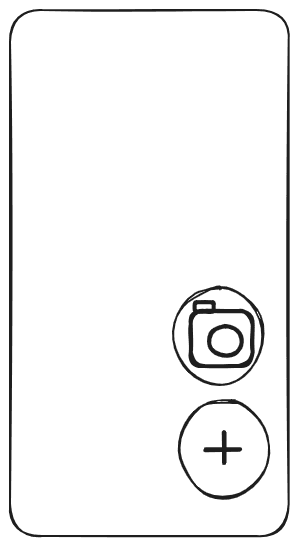
This idea was selected as the basis for creating the wireframe.
Wireframes

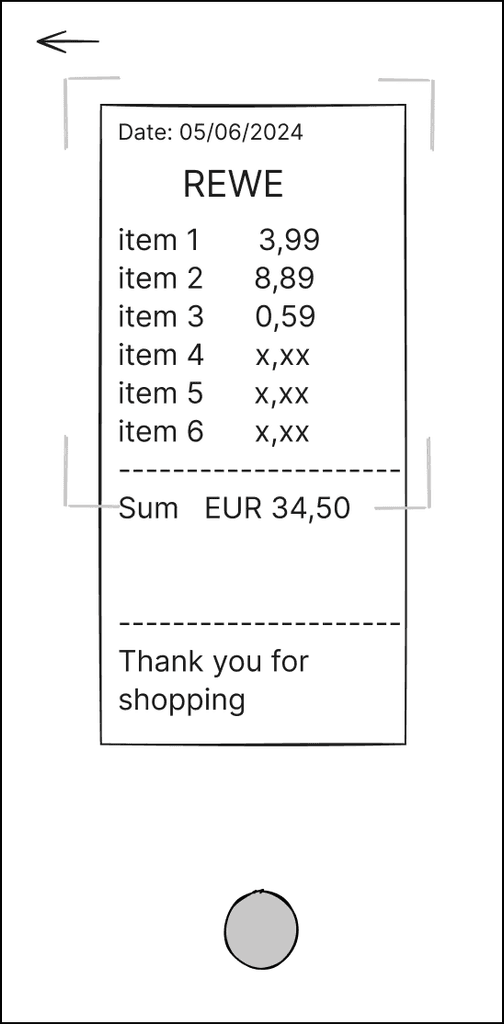

Test
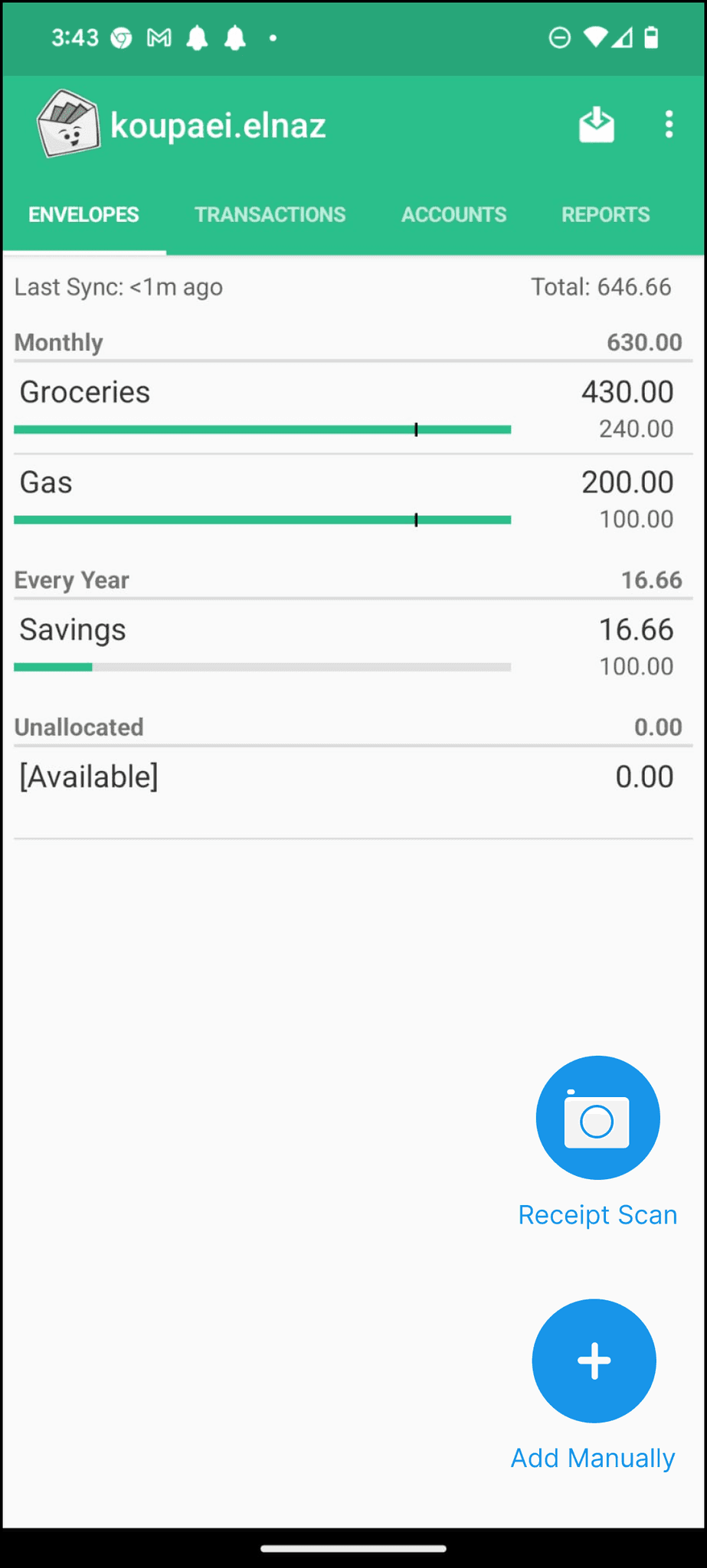
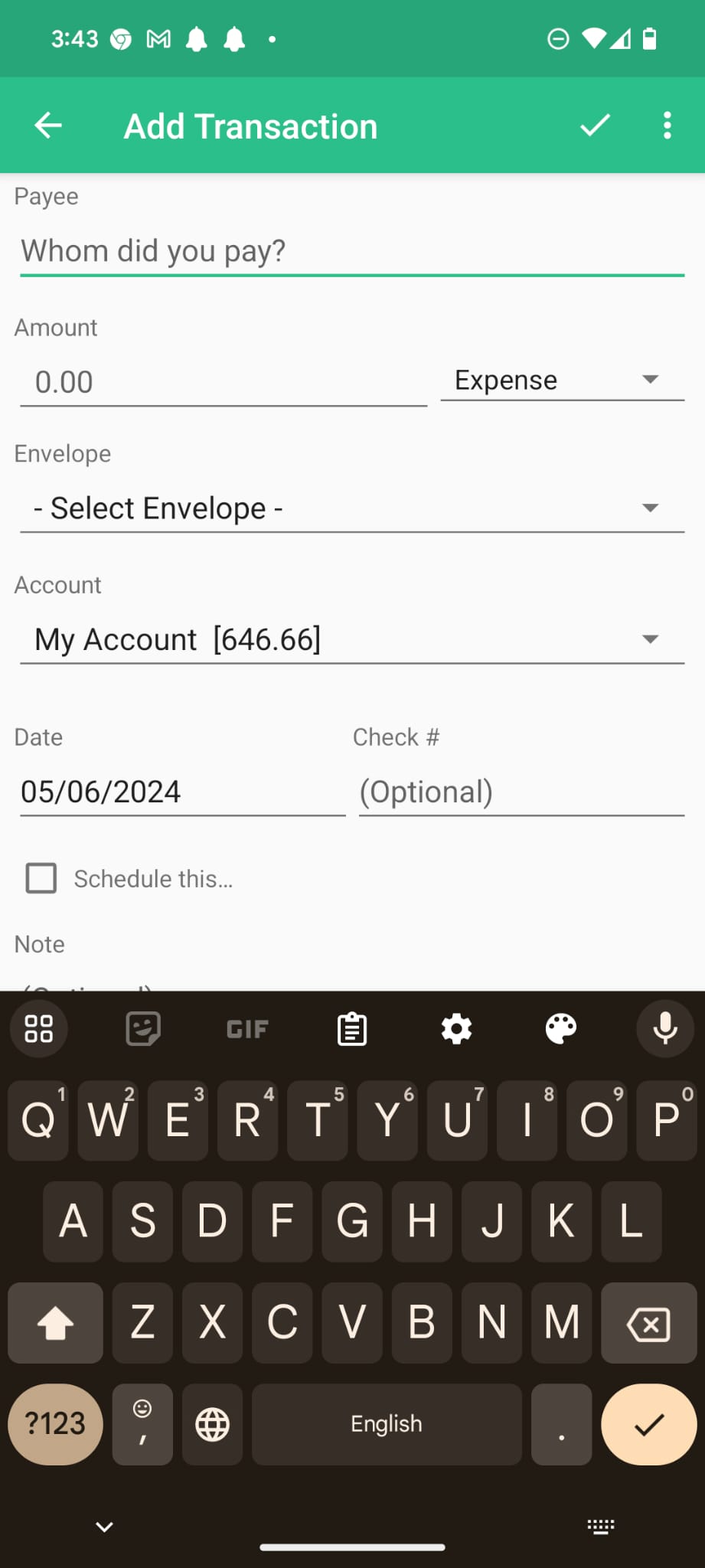
We tested the results with two potential users. They found it confusing that the "Add" button and the camera button were located close to each other and seemed to have the same function, but it wasn't clear to them. Therefore, we decided to add a label to make it clearer.

Before
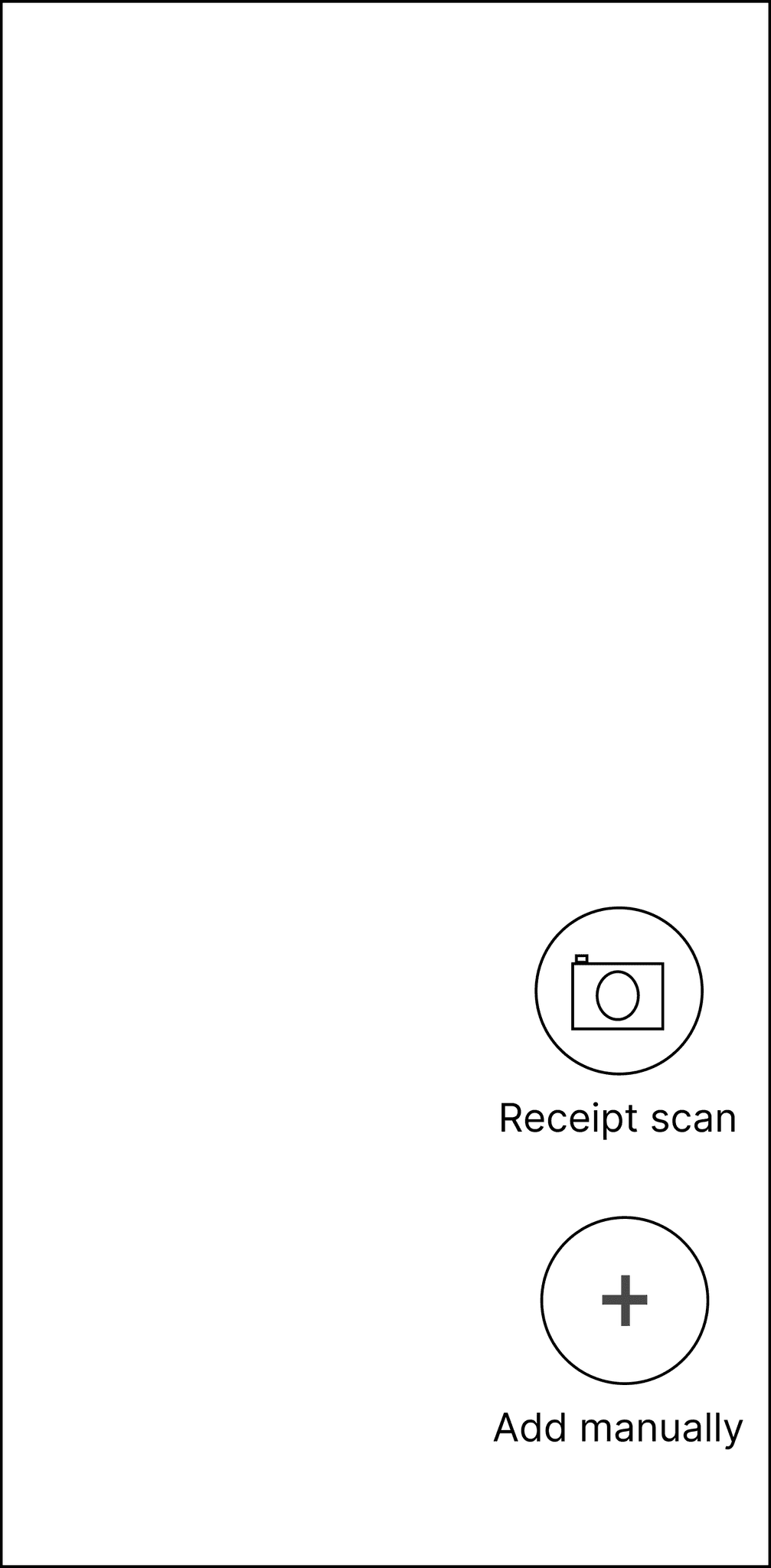
After
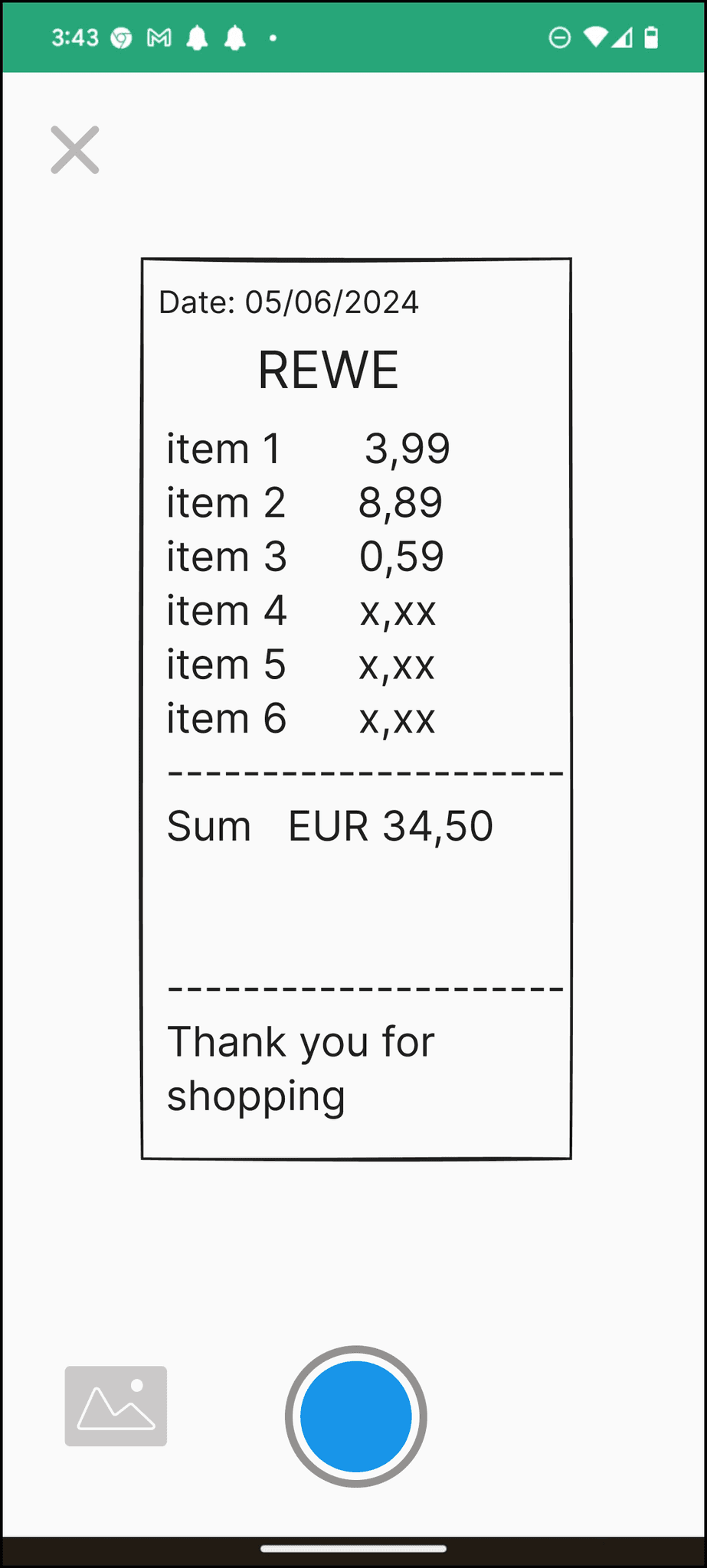
High-Fidelity Frames
Good Budget
Tools Used
Project Duration
2 weeks
Team
Two Students
Overview
"Goodbudget" is a budget tracking application. Users currently manually input their expenses. This study aimed to explore the addition of an automatic transaction entry feature to enhance user satisfaction.
Design Process
RESEARCH
DEFINE
IDEATE
DESIGN
TEST
Research
First, we formulated the initial hypothesis to be evaluated through research.
Hypothesis: adding a feature to the budget tracking app that allows users to automatically input financial data increases user satisfaction
Then, we conducted competitive analysis by reviewing other budge planner applications to assess how they automate data entry. We examined various user flows and analyzed user reviews. We found that incorporating the feature of connecting the app to the user’s bank account could be a viable choice. However, we were unsure if users would trust the app to provide their financial account information. Taking all of this into consideration, we created the survey questions. Here are the findings:
How do you import your financial data into a budget planner app?
Manually
Automatically
Both
62%
27%
11%
which one do you prefer for importing your data in a budget planner app?
Automatically
Manually
63%
37%
On a scale of 1 to 5, how interested are you in providing your financial account information in a budget planner app for the purpose of automatically importing your financial data? 1: Not interested at all - 5:Very interested
How concerned are you about the security and privacy of your financial data when importing it into a budget planner app? 1: Not concerned at all - 5: entirely concerned
What features or functionality would you like to see in a budget planner app to facilitate importing data from expenses you have paid?
Survey Results Analysis
The hypothesis is confirmed
Users would like to have their financial accounts connected to the budget apps but they are highly concerned about security.
Among all the alternative solutions (voice input, barcode scanning &...) most of the users have a tendency to have “receipt scanning” option in their budgeting app.
Define
Problem: Designin a receipt scan feature for “Goodbudget” application.
Challenge
where in the user journey we could integrate this receipt scan feature?
This is the user interface of the 'Goodbudget' application before the change.
Solution
The 'Crazy Eight' method helped us brainstorm different solutions.
Research
we returned to the research phase to cultivate further empathy with the users. We interviewed three users to gain a deeper understanding of their needs and emotions. Based on its findings, we created the user journey map.
RESEARCH
DEFINE
IDEATE
DESIGN
TEST
User Journey Map
Scenario: Shiva wants to plan a birthday celebration for her nephew. She buys items from various shops and wants to add them to her budgeting app.
Buyying
She purchased birthday items from a supermarket, a clothing store, and a decoration store.
In total, she spent 65 Euros today.
I need to input data when I arrive home.
Using the app
It takes too much time to insert diffreent receipts manually.
Shiva arrives home, worried about the amount of money spent. She still has a lot to do.
She opens her budgeting app and enters the information from one of her receipts. There are still two more remaining, and there are lots of fields to fill. Feeling overwhelmed, she closes the app.
Checking the
budget
Next time Shiva looks at the budget app dashboard she sees 35 Euro is missing!
I have forgotten to input Two of the receipts on Tara’s birthday!
Insights
The user is already concerned about the amount of money spent and overwhelmed by the effort of buying various items when openning the app to input the data.n. Taking all of this into consideration, we created the survey questions. Here are the findings:
Conclusions
The receipt scanning feature should be very Clear & available and works without extra steps to reduce the presure.
Data should be extracted and organized very clearly after scanning the photo.
Analyzing Crazy Eights
Considering the conclusions mentioned above, seven out of the eight ideas were rejected for the reasons outlined below.
The receipt scan button is not visible in the Home page at first glance.
The receipt scan button and manual entry button are conceptually equivalent within the same category but are located in different places
There is an additional step required to access the transaction entry buttons.
There is an additional step required to access the transaction entry buttons.They are also located at the same level as other items under the three-dot menu, even though they are more commonly used.
There is no reason why the receipt scan button should be more obvious than the manual entry button.
Placing the receipt scan button after the manual entry field makes this page confusing.
It's preferred not to remove the plus button to avoid confusing users with too many changes.
This idea was selected as the basis for creating the wireframe.
Wireframes
Test
We tested the results with two potential users. They found it confusing that the "Add" button and the camera button were located close to each other and seemed to have the same function, but it wasn't clear to them. Therefore, we decided to add a label to make it clearer.
Before
After
High-Fidelity Frames
Good Budget
Tools Used
Project Duration
2 Weeks
Team
Two Designers
Overview
"Goodbudget" is a budget tracking application. Users currently manually input their expenses. This study aimed to explore the addition of an automatic transaction entry feature to enhance user satisfaction.
Design Process
RESEARCH
DEFINE
IDEATE
DESIGN
TEST
Research
First, we formulated the initial hypothesis to be evaluated through research.
Hypothesis: adding a feature to the budget tracking app that allows users to automatically input financial data increases user satisfaction
Then, we conducted competitive analysis by reviewing other budge planner applications to assess how they automate data entry. We examined various user flows and analyzed user reviews. We found that incorporating the feature of connecting the app to the user’s bank account could be a viable choice. However, we were unsure if users would trust the app to provide their financial account information. Taking all of this into consideration, we created the survey questions. Here are the findings:
How do you import your financial data into a budget planner app?
Manually
Automatically
Both
62 %
27%
11%
which one do you prefer for importing your data in a budget planner app?
Automatically
Manually
63%
37%
On a scale of 1 to 5, how interested are you in providing your financial account information in a budget planner app for the purpose of automatically importing your financial data? 1: Not interested at all - 5:Very interested
How concerned are you about the security and privacy of your financial data when importing it into a budget planner app? 1: Not concerned at all - 5: entirely concerned
What features or functionality would you like to see in a budget planner app to facilitate importing data from expenses you have paid?
Survey Results Analysis
The hypothesis is confirmed.
Users would like to have their financial accounts connected to the budget apps but they are highly concerned about security.
Among all the alternative solutions (voice input, barcode scanning &...) most of the users have a tendency to have “receipt scanning” option in their budgeting app.
Define
Problem: Designin a receipt scan feature for “Goodbudget” application.
Challenge
where in the user journey we could integrate this receipt scan feature?
This is the user interface of the 'Goodbudget' application before the change.
Solution
The 'Crazy Eight' method helped us brainstorm different solutions.
Research
we returned to the research phase to cultivate further empathy with the users. We interviewed three users to gain a deeper understanding of their needs and emotions. Based on its findings, we created the user journey map.
RESEARCH
DEFINE
IDEATE
DESIGN
TEST
User Journey Map
Scenario: Shiva wants to plan a birthday celebration for her nephew. She buys items from various shops and wants to add them to her budgeting app.
Buyying
She purchased birthday items from a supermarket, a clothing store, and a decoration store.
In total, she spent 65 Euros today.
I need to input data when I arrive home.
Using budgetting app
Shiva arrives home, worried about the amount of money spent. She still has a lot to do.
She opens her budgeting app and enters the information from one of her receipts. There are still two more remaining, and there are lots of fields to fill. Feeling overwhelmed, she closes the app.
It takes too much time to insert diffreent receipts manually.
Checking the budget
I have forgotten to input Two of the receipts on Tara’s birthday!
Next time Shiva looks at the budget app dashboard she sees 35 Euro is missing!
Insights
The user is already concerned about the amount of money spent and overwhelmed by the effort of buying various items when openning the app to input the data.n. Taking all of this into consideration, we created the survey questions. Here are the findings:
Conclusions
The receipt scanning feature should be very Clear & available and works without extra steps to reduce the presure.
Data should be extracted and organized very clearly after scanning the photo.
Analyzing Crazy Eights
Considering the conclusions mentioned above, seven out of the eight ideas were rejected for the reasons outlined below.
The receipt scan button is not visible in the Home page at first glance.
The receipt scan button and manual entry button are conceptually equivalent within the same category but are located in different places
There is an additional step required to access the transaction entry buttons.
There is an additional step required to access the transaction entry buttons.They are also located at the same level as other items under the three-dot menu, even though they are more commonly used.
There is no reason why the receipt scan button should be more obvious than the manual entry button.
Placing the receipt scan button after the manual entry field makes this page confusing.
It's preferred not to remove the plus button to avoid confusing users with too many changes.
This idea was selected as the basis for creating the wireframe.
Wireframes
REWE
Date: 05/06/2024
Payee
Amount
34.5
Envelope
Groceries
My Account
Account
Date
05/06/2024
Add another Receipt
Test
We tested the results with two potential users. They found it confusing that the "Add" button and the camera button were located close to each other and seemed to have the same function, but it wasn't clear to them. Therefore, we decided to add a label to make it clearer.
Before
Add manually
Receipt scan
After
High-Fidelity Frames
Add Manually
Receipt Scan
REWE
Date: 05/06/2024
Add another Receipt
34.5
Groceries
My Account
05/06/2024
Receipt Scan